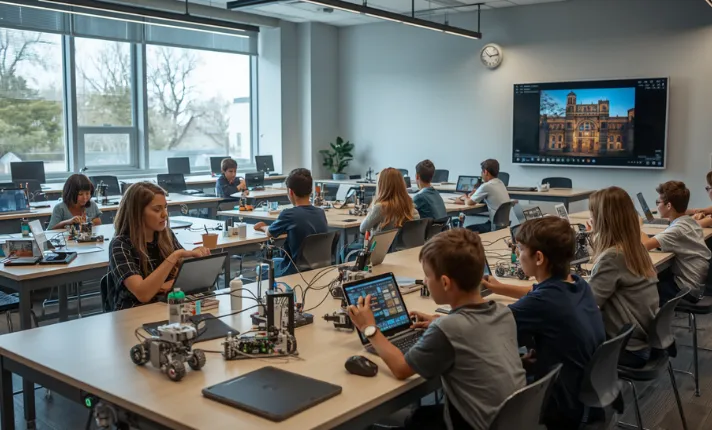
STEM curriculum enhancements with edtech work best when technology changes how students investigate, test, explain, and revise ideas. Many schools buy software first and redesign instruction later. That usually creates fragmented lessons, teacher overload, and weak learning outcomes. Strong STEM programs start with curriculum goals, then choose digital tools that improve experimentation, feedback, collaboration, or data analysis. This article explains where edtech actually improves STEM learning, where it often fails, and how schools can build practical systems that teachers can sustain across science, math, engineering, and computer science classrooms.
Why STEM curriculum changes need more than new software
Most STEM classrooms already use some technology. The problem is that many tools sit outside the curriculum instead of supporting it directly.
A district may purchase:
- A learning management system
- Virtual lab subscriptions
- Coding apps
- Assessment dashboards
- AI tutoring platforms
Students still complete the same worksheets and memorize the same facts.
That gap matters. Real STEM learning depends on inquiry, testing, revision, and evidence-based reasoning. If technology only digitizes old routines, the curriculum barely changes.
What edtech should fix in a STEM classroom
Good STEM technology removes specific instructional bottlenecks.
Examples:
- Simulations help students visualize molecular interactions that cannot be observed directly.
- Shared coding environments reduce setup time during collaborative programming tasks.
- Digital sensors capture real-time environmental data during science investigations.
- Adaptive math systems identify repeated misconceptions within minutes instead of weeks.
Each example changes the learning process itself.
Where simple tool adoption fails
Schools often fail in three predictable ways:
- Too many platforms
Teachers manage six or seven disconnected systems with separate logins, grading methods, and dashboards. - Weak curriculum integration
Students use the tool once during a “technology day” instead of repeatedly across units. - No instructional purpose
The technology exists because funding became available, not because a learning problem needed solving.
Research from the International Society for Technology in Education repeatedly shows that instructional design matters more than device quantity.
What stronger curriculum design looks like
Strong STEM curriculum enhancements with edtech usually include:
- Clear learning targets
- Repeated use across units
- Measurable performance outcomes
- Student creation instead of passive consumption
- Teacher feedback loops
- Data-informed revision
Schools with stable implementation often start with one department or one grade level before expanding.
The ignored angle: curriculum gaps that edtech often misses
Many articles assume every student has stable internet, modern devices, and quiet study space. Real classrooms rarely look like that.
Paper-based labs still matter
Virtual labs help with safety, cost, and repeatability. They do not fully replace hands-on experimentation.
Example:
Students learning electrical circuits still struggle with physical wire placement, faulty connections, and resistance measurement unless they touch actual materials.
Experienced STEM teachers often use:
- Virtual simulation before lab work
- Physical experiment during instruction
- Digital analysis after data collection
That sequence reduces confusion without removing practical skills.
Students with one school device and none at home
This problem gets ignored constantly.
Many STEM assignments assume:
- Evening internet access
- Stable electricity
- Shared household support
- Quiet workspace
In practice, teachers often need:
- Offline exports
- Downloadable lab instructions
- Mobile-friendly assignments
- Printed backup materials
Schools that ignore this create hidden inequity even when every student technically receives a device.
Accessibility needs for learners with disabilities
Some STEM tools still create accessibility problems:
- Small interface elements
- Poor screen reader support
- Drag-and-drop dependence
- Weak captioning
- Color-only visual cues
Accessibility testing should happen before district-wide rollout.
The World Wide Web Consortium WCAG standards remain one of the strongest references for educational accessibility planning.
Language support for multilingual classrooms
Science and engineering vocabulary already challenge many students. STEM platforms that only support English instructions create additional barriers.
Useful features include:
- Built-in translation
- Audio instructions
- Visual modeling
- Simplified vocabulary modes
- Captioned demonstrations
These features matter more in real classrooms than flashy dashboards.
The “it depends” situation: when edtech helps and when it backfires
Standard advice often assumes more technology automatically improves STEM instruction. Reality depends heavily on context.
High-tech tools in low-readiness classrooms
A sophisticated robotics program can fail if:
- Teachers receive only one afternoon of training
- Devices break frequently
- Wi-Fi drops during lessons
- Students lack prerequisite skills
Sometimes a simpler setup produces stronger learning.
Example:
Spreadsheet-based data analysis may outperform expensive analytics software during middle school science instruction because students spend more time reasoning and less time troubleshooting.
Projects that become busywork
Project-based learning sounds excellent in theory. Poorly structured projects often become presentation exercises with shallow STEM reasoning.
Warning signs include:
- Decorative slides replacing evidence
- Group imbalance
- Minimal testing
- Weak revision cycles
- Students copying internet solutions
Good STEM projects require:
- Constraints
- Testing procedures
- Measurable outcomes
- Reflection checkpoints
When too many platforms hurt instruction
Teachers frequently describe “platform fatigue.”
Students forget passwords. Notifications multiply. Assignments scatter across systems.
One district technology coordinator told researchers from Education Week that teachers spent more time managing software workflows than discussing student thinking during the first implementation year.
Consolidation matters.
When low-tech routines are better
Some tasks simply do not improve through technology.
Examples:
- Quick whiteboard problem solving
- Group sketching
- Fast brainstorming
- Lab safety discussions
Experienced teachers know when digital tools slow momentum instead of improving it.
What top STEM programs usually get right
Successful STEM systems share patterns regardless of grade level or budget.
Clear learning goals before tool selection
Strong schools ask:
“What specific learning problem are we solving?”
Weak schools ask:
“What software should we buy?”
That difference changes everything.
Hands-on tasks with digital support
The strongest classrooms blend:
- Physical experimentation
- Digital modeling
- Collaborative discussion
- Reflection
Students move between formats naturally.
Teacher-facing dashboards that inform instruction
Useful dashboards answer practical questions:
- Which students misunderstand slope?
- Which lab groups need intervention?
- Which coding errors appear repeatedly?
Overloaded analytics systems bury teachers in unnecessary data.
Strong links to standards and outcomes
Effective STEM curriculum enhancements with edtech connect directly to:
- Next Generation Science Standards frameworks
- State curriculum requirements
- Engineering design standards
- Computer science competencies
Teachers need alignment clarity before implementation starts.
A practical framework for STEM curriculum enhancements with edtech
Large district rollouts often fail because they start too big.
Step 1: Map one unit, not the whole district
Choose:
- One grade level
- One STEM subject
- One instructional unit
Pilot changes there first.
Step 2: Add digital tools only where they change student work
Ask:
“What becomes possible with this tool that was difficult before?”
If the answer is unclear, the tool may not matter.
Step 3: Set evidence checks before launch
Measure:
- Student understanding
- Completion rates
- Teacher workload
- Technical failure frequency
- Engagement quality
Without baseline data, schools cannot evaluate success honestly.
Step 4: Review results after the unit
Strong programs revise continuously.
Common adjustments include:
- Shorter onboarding
- Reduced platform count
- Better rubric clarity
- Simplified login systems
- Smaller collaborative groups
STEM curriculum enhancements with edtech in science
Science classrooms benefit heavily from carefully chosen digital tools.
Virtual labs for pre-lab preparation
Virtual labs reduce:
- Material waste
- Setup confusion
- Safety mistakes
Students enter physical labs with stronger procedural understanding.
PhET Interactive Simulations remains one of the most widely used free resources for science and math simulation work.
Simulations for invisible processes
Students cannot directly observe:
- Electron movement
- Plate tectonic shifts over millions of years
- Molecular bonding
- Magnetic field interactions
Simulation software helps students test variables repeatedly.
Data logging and analysis tools
Digital probes improve:
- Precision
- Speed
- Graph generation
- Trend analysis
Students spend more time interpreting results instead of manually copying measurements.
Citizen science and field observation apps
Some schools now integrate:
- Biodiversity mapping
- Air quality monitoring
- Weather data collection
- Water testing projects
Students connect local environments to scientific analysis.
STEM curriculum enhancements with edtech in mathematics
Math technology works best when it strengthens reasoning instead of automating everything.
Adaptive practice without losing teacher control
Adaptive systems help identify:
- Repeated misconceptions
- Weak prerequisite skills
- Skill progression gaps
The danger is overreliance on auto-generated practice without discussion.
Visual models for algebra and geometry
Interactive graphing tools improve conceptual understanding when students manipulate variables directly.
Desmos changed many algebra classrooms because students can immediately test equation changes visually.
Error analysis using student response data
Good math platforms show:
- Wrong answer patterns
- Timing trends
- Misapplied procedures
That information helps teachers intervene earlier.
Why math tech should still require explanation
Students can produce correct outputs without understanding reasoning.
Strong classrooms still require:
- Written explanations
- Verbal reasoning
- Multi-step justification
- Peer discussion
Otherwise performance becomes fragile.
STEM curriculum enhancements with edtech in engineering and design
Engineering instruction improves when students can iterate rapidly.
CAD and prototyping tools
Digital design tools help students:
- Measure accurately
- Revise quickly
- Share prototypes
- Test constraints
Younger students often need simplified interfaces first.
3D printing as a curriculum tool
3D printing fails when it becomes novelty-based.
It works better when tied directly to:
- Measurement accuracy
- Material constraints
- Prototype revision
- Functional testing
Experienced engineering teachers usually restrict print attempts to force stronger planning.
Design notebooks in digital form
Digital notebooks allow:
- Embedded photos
- Time-stamped revisions
- Collaborative comments
- Reflection tracking
That documentation improves assessment quality.
Testing and revision cycles
Good engineering programs grade iteration quality, not just final products.
Students should explain:
- What failed
- Why it failed
- What changed afterward
That process matters more than polished presentation.
STEM curriculum enhancements with edtech in computer science
Computer science education changes quickly, especially with AI-assisted coding.
Coding as problem solving
Strong programs focus on:
- Logic
- Decomposition
- Debugging
- Testing
Not memorizing syntax alone.
Robotics for debugging and iteration
Robotics creates immediate feedback loops.
Students see:
- Movement errors
- Timing problems
- Sensor failures
- Logic mistakes
Those visible outcomes improve persistence.
AI tools with classroom rules
AI-assisted coding tools now appear in many schools.
Clear rules matter:
- What students may generate
- What students must explain independently
- When AI use is prohibited
- How sources must be documented
Without boundaries, assessment reliability weakens fast.
Computational thinking across STEM subjects
Computer science concepts increasingly appear in:
- Biology modeling
- Statistical analysis
- Environmental simulations
- Engineering systems
Cross-subject integration is growing faster than many curriculum guides acknowledge.
Assessment that proves learning instead of tracking clicks
Platform analytics alone do not measure understanding.
Performance tasks over passive quizzes
Better STEM assessments include:
- Design challenges
- Lab reports
- Model creation
- Data interpretation
- Coding explanations
These reveal thinking quality more clearly.
Rubrics for digital projects
Strong rubrics evaluate:
- Accuracy
- Evidence use
- Revision quality
- Technical communication
- Collaboration
Rubrics should stay visible throughout projects, not only during grading.
Using LMS data carefully
Dashboard metrics can mislead.
A student spending 90 minutes online may be:
- Productive
- Distracted
- Confused
- Technically stuck
Teachers still need direct observation.
Checking whether students can explain work
One of the fastest quality checks:
Ask students to explain decisions verbally.
Students who understand can usually:
- Defend methods
- Explain revisions
- Predict outcomes
- Identify mistakes
Teacher workload and planning realities
Many STEM articles ignore teacher workload completely.
The extra time hidden in lesson setup
Teachers often spend hours:
- Testing links
- Resetting passwords
- Uploading templates
- Troubleshooting compatibility
- Revising instructions
Implementation plans should include paid planning time.
Shared templates save time
Departments reduce burnout by sharing:
- Lab structures
- Assessment rubrics
- Setup guides
- Troubleshooting notes
- Digital workflow examples
Collaboration matters more than perfect software.
Common training mistakes
Weak professional development often:
- Demonstrates tools without curriculum context
- Moves too quickly
- Ignores classroom management
- Skips troubleshooting
Teachers need realistic examples from actual classrooms.
What teachers actually need
Experienced teachers usually ask for:
- Simpler workflows
- Stable systems
- Better technical support
- Time for revision
- Examples from similar grade levels
Those needs rarely appear in vendor marketing.
Equity, access, and inclusion
Equity problems do not disappear because devices exist.
Device access and bandwidth
Some households still share:
- One device
- Limited data
- Unstable electricity
- Weak internet coverage
Offline capability remains important.
Offline options for home learning gaps
Useful approaches include:
- Downloadable PDFs
- Cached video lessons
- Printable datasets
- USB-based software access
Schools that plan for interruptions adapt faster during disruptions.
Assistive tools for diverse learners
Helpful supports include:
- Speech-to-text
- Adjustable font sizing
- Audio feedback
- Captioned instructions
- Keyboard navigation
Accessibility planning should happen during procurement, not afterward.
Culturally relevant STEM tasks
Students engage more deeply when STEM connects to local contexts.
Examples:
- Water quality testing
- Traffic analysis
- Air pollution measurement
- Agricultural engineering problems
Local relevance improves participation.
Procurement and funding choices school leaders should not ignore
Edtech purchasing mistakes can drain budgets quickly.
How to compare tools beyond marketing claims
Ask vendors:
- What training is included?
- What accessibility standards are supported?
- What export formats exist?
- How does offline mode work?
- What data privacy rules apply?
Specific questions reveal weak products fast.
Pilot programs before full rollout
Small pilots expose:
- Technical failures
- Workflow confusion
- Support gaps
- Teacher resistance
Large-scale launches without pilots often create avoidable chaos.
Total cost beyond licenses
Real costs include:
- Device replacement
- Training time
- Network upgrades
- Support staffing
- Maintenance
Some “low-cost” tools become expensive within two years.
Where districts lose money
Districts commonly overpay for:
- Unused licenses
- Duplicate software
- Short-term pilot subscriptions
- Poorly integrated systems
Usage audits should happen yearly.
Myth vs reality in STEM curriculum and edtech
Myth: more technology always improves STEM learning
Research does not support this consistently.
Poorly integrated technology can reduce instructional clarity and increase distraction.
Myth: engagement equals understanding
Students may enjoy a simulation while misunderstanding the science completely.
Engagement matters. Accurate reasoning matters more.
Myth: one platform fixes curriculum gaps
No platform replaces:
- Strong instruction
- Curriculum coherence
- Teacher expertise
- Assessment quality
Software cannot repair weak curriculum design alone.
Reality: teacher design matters most
Experienced STEM teachers consistently shape better outcomes than expensive platforms by themselves.
Technology amplifies instructional quality. It rarely replaces it.
Advanced strategies for experienced STEM teams
Advanced implementation problems differ from beginner problems.
Building a multi-year rollout plan
Experienced schools phase implementation carefully:
- Year 1: pilot and infrastructure
- Year 2: curriculum alignment
- Year 3: scaling and revision
Fast rollouts often collapse under support demands.
Connecting K–12 STEM pathways
Strong systems connect:
- Elementary inquiry
- Middle school engineering
- High school specialization
- Career pathways
Students build continuity over time.
Cross-subject projects without losing rigor
Interdisciplinary STEM projects sometimes dilute subject depth.
Good programs keep:
- Clear standards
- Subject-specific assessment
- Explicit technical vocabulary
- Defined evidence requirements
Scaling successful pilots
Scaling requires:
- Shared documentation
- Coaching systems
- Stable infrastructure
- Teacher leadership teams
Districts often underestimate coordination demands.
Information gain: the 30-day implementation plan most articles skip
Most articles discuss strategy but ignore operational rollout.
Here is a realistic 30-day implementation structure used in several successful district pilots.
Week 1: audit one instructional unit
Review:
- Learning objectives
- Existing assessments
- Student pain points
- Technical limitations
Identify one bottleneck only.
Week 2: choose one digital change
Add a single improvement:
- Simulation
- Shared notebook
- Sensor system
- Automated feedback process
Do not redesign everything simultaneously.
Week 3: collect evidence
Track:
- Student confusion points
- Technical failures
- Time savings
- Completion quality
- Teacher workload changes
Write observations immediately after lessons.
Week 4: revise before expansion
Refine:
- Instructions
- Group size
- Device setup
- Assessment criteria
- Support materials
Only expand after stable classroom performance.
That measured rollout process gets ignored in most STEM curriculum enhancement articles, yet it often determines long-term success.
People also ask
Q: What is the best edtech for STEM education?
The best edtech depends on instructional goals and grade level. Simulation platforms, graphing tools, coding environments, robotics systems, and collaborative notebooks all solve different problems. Schools usually get better results by choosing fewer well-integrated tools instead of building large disconnected software collections.
Q: How do you integrate technology into STEM curriculum?
Start with one instructional problem instead of buying tools broadly. Identify where students struggle, then choose technology that improves experimentation, modeling, collaboration, or feedback. Pilot the change in one unit, measure outcomes, revise the workflow, and expand gradually.
Q: What are the biggest barriers to edtech in STEM?
The biggest barriers are inconsistent training, device reliability, overloaded platforms, weak curriculum alignment, and unequal student access outside school. Teacher planning time also becomes a major issue during implementation.
FAQ
Q: How do schools choose the right edtech tools for STEM programs?
A: Schools should evaluate tools against curriculum goals first. Strong evaluation criteria include accessibility support, offline capability, standards alignment, assessment integration, teacher usability, and technical support quality. Small pilot programs usually reveal more useful information than vendor demonstrations. Schools should also review long-term costs, including device replacement, licensing renewals, and teacher training time.
Q: How do teachers avoid overload during STEM edtech implementation?
A: Teachers avoid overload by limiting platform count and standardizing workflows across departments. Shared templates, common grading structures, and centralized login systems reduce daily friction. Many successful schools begin with one or two tools used consistently instead of introducing multiple new systems simultaneously. Scheduled planning time also matters because implementation requires lesson revision and troubleshooting.
Q: What works for low-budget STEM classrooms?
A: Low-budget classrooms can still build strong STEM experiences through free simulations, spreadsheet analysis, open-source coding platforms, and locally relevant projects. Simple data collection activities often produce better learning than expensive devices when instruction remains clear and structured. Reliable low-cost systems usually outperform unstable high-cost programs with weak support.
Q: How do schools measure whether STEM edtech is actually working?
A: Schools should measure student reasoning, project quality, collaboration, and problem-solving performance instead of relying only on usage statistics. Useful evidence includes assessment growth, revision quality, lab performance, and student explanation accuracy. Teacher workload and technical reliability should also be reviewed because unstable systems weaken long-term adoption.
Q: How do schools balance hands-on STEM learning with digital tools?
A: The strongest classrooms combine physical experimentation with digital analysis and modeling. Students may use simulations before labs, collect real-world data during activities, and analyze findings afterward using software tools. That sequence preserves practical skills while improving understanding, efficiency, and reflection quality.


KEEP READING

AI Tutors: Personalized learning paths are changing how people learn by adjusting lessons to each learner’s needs, speed, and goals. Instead of forcing everyone through the same content, AI tutors [...]
Adaptive learning technology solutions in education are revolutionizing the way students learn by tailoring lessons to each individual’s pace, strengths, and gaps. Imagine a classroom where every quiz, video, or [...]
Imagine a training platform that knows each learner’s needs before they do. With AI powered learning management systems, you get personalized learning paths, instant feedback, and data-driven insights—all without extra [...]